Parallel communication in the context of Conventional PCI


Parallel communication in the context of Conventional PCI

Parallel communication Study page number 1 of 1

Play TriviaQuestions Online!

or

Skip to study material about Parallel communication in the context of "Conventional PCI"


⭐ Core Definition: Parallel communication

In data transmission, parallel communication is a method of conveying multiple binary digits (bits) simultaneously using multiple conductors. This contrasts with serial communication, which conveys only a single bit at a time; this distinction is one way of characterizing a communications link.

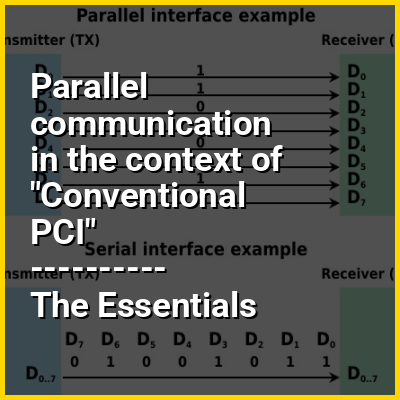
The basic difference between a parallel and a serial communication channel is the number of electrical conductors used at the physical layer to convey bits. Parallel communication implies more than one such conductor. For example, an 8-bit parallel channel will convey eight bits (or a byte) simultaneously, whereas a serial channel would convey those same bits sequentially, one at a time. If both channels operated at the same clock speed, the parallel channel would be eight times faster. A parallel channel may have additional conductors for other signals, such as a clock signal to pace the flow of data, a signal to control the direction of data flow, and handshaking signals.

↓ Menu
HINT:

👉 Parallel communication in the context of Conventional PCI

Peripheral Component Interconnect (PCI) is a local computer bus for attaching hardware devices in a computer and is part of the PCI Local Bus standard. The PCI bus supports the functions found on a processor bus but in a standardized format that is independent of any given processor's native bus. Devices connected to the PCI bus appear to a bus master to be connected directly to its own bus and are assigned addresses in the processor's address space. It is a parallel bus, synchronous to a single bus clock.Attached devices can take either the form of an integrated circuit fitted onto the motherboard (called a planar device in the PCI specification) or an expansion card that fits into a slot. The PCI Local Bus was first implemented in IBM PC compatibles, where it displaced the combination of several slow Industry Standard Architecture (ISA) slots and one fast VESA Local Bus (VLB) slot as the bus configuration. It has subsequently been adopted for other computer types. Typical PCI cards used in PCs include: network cards, sound cards, modems, extra ports such as Universal Serial Bus (USB) or serial, TV tuner cards and hard disk drive host adapters. PCI video cards replaced ISA and VLB cards until rising bandwidth needs outgrew the abilities of PCI. The preferred interface for video cards then became Accelerated Graphics Port (AGP), a superset of PCI, before giving way to PCI Express.

The first version of PCI found in retail desktop computers was a 32-bit bus using a 33 MHz bus clock and V signaling, although the PCI 1.0 standard provided for a 64-bit variant as well. These have one locating notch in the card. Version 2.0 of the PCI standard introduced 3.3 V slots, physically distinguished by a flipped physical connector to prevent accidental insertion of 5 V cards. Universal cards, which can operate on either voltage, have two notches. Version 2.1 of the PCI standard introduced optional 66 MHz operation. A server-oriented variant of PCI, PCI Extended (PCI-X) operated at frequencies up to 133 MHz for PCI-X 1.0 and up to 533 MHz for PCI-X 2.0. An internal connector for laptop cards, called Mini PCI, was introduced in version 2.2 of the PCI specification. The PCI bus was also adopted for an external laptop connector standard – the CardBus. The first PCI specification was developed by Intel, but subsequent development of the standard became the responsibility of the PCI Special Interest Group (PCI-SIG).
↓ Explore More Topics
In this Dossier

Parallel communication in the context of Data (computer science)

In computer science, data (treated as singular, plural, or as a mass noun) is any sequence of one or more symbols; datum is a single unit of data. Data requires interpretation to become information. Digital data is data that is represented using the binary number system of ones (1) and zeros (0), instead of analog representation. In modern (post-1960) computer systems, all data is digital.

Data exists in three states: data at rest, data in transit and data in use. Data within a computer, in most cases, moves as parallel data. Data moving to or from a computer, in most cases, moves as serial data. Data sourced from an analog device, such as a temperature sensor, may be converted to digital using an analog-to-digital converter. Data representing quantities, characters, or symbols on which operations are performed by a computer are stored and recorded on magnetic, optical, electronic, or mechanical recording media, and transmitted in the form of digital electrical or optical signals. Data pass in and out of computers via peripheral devices.

View the full Wikipedia page for Data (computer science)
↑ Return to Menu

Parallel communication in the context of Serial communication

In telecommunication and data transmission, serial communication is the process of sending data one bit at a time, sequentially, over a communication channel or computer bus. This is in contrast to parallel communication, where several bits are sent as a whole, on a link with several parallel channels.

Serial communication is used for all long-haul communication and most computer networks, where the cost of cable and difficulty of synchronization make parallel communication impractical. Serial computer buses have become more common even at shorter distances, as improved signal integrity and transmission speeds in newer serial technologies have begun to outweigh the parallel bus's advantage of simplicity (no need for serializer and deserializer, or SerDes) and to outstrip its disadvantages (clock skew, interconnect density). The migration from PCI to PCI Express (PCIe) is an example.

View the full Wikipedia page for Serial communication
↑ Return to Menu

Parallel communication in the context of Frequency division multiplexing

In telecommunications, frequency-division multiplexing (FDM) is a technique by which the total bandwidth available in a communication medium is divided into a series of non-overlapping frequency bands, each of which is used to carry a separate signal. This allows a single transmission medium such as a microwave radio link, cable or optical fiber to be shared by multiple independent signals. Another use is to carry separate serial bits or segments of a higher rate signal in parallel.

The most common example of frequency-division multiplexing is radio and television broadcasting, in which multiple radio signals at different frequencies pass through the air at the same time. Another example is cable television, in which many television channels are carried simultaneously on a single cable. FDM is also used by telephone systems to transmit multiple telephone calls through high capacity trunklines, communications satellites to transmit multiple channels of data on uplink and downlink radio beams, and broadband DSL modems to transmit large amounts of computer data through twisted pair telephone lines, among many other uses.

View the full Wikipedia page for Frequency division multiplexing
↑ Return to Menu

Parallel communication in the context of Serial port

A serial port is a serial communication interface through which information transfers in or out sequentially one bit at a time. This is in contrast to a parallel port, which communicates multiple bits simultaneously in parallel. Throughout most of the history of personal computers, data has been transferred through serial ports to devices such as modems, terminals, various peripherals, and directly between computers.

While interfaces such as Ethernet, FireWire, and USB also send data as a serial stream, the term serial port usually denotes hardware compliant with RS-232 or a related standard, such as RS-485 or RS-422.

View the full Wikipedia page for Serial port
↑ Return to Menu

Parallel communication in the context of Parallel port

In computing, a parallel port is a type of interface found on early computers (personal and otherwise) for connecting peripherals. The name refers to the way the data is sent; parallel ports send multiple bits of data at once (parallel communication), as opposed to serial communication, in which bits are sent one at a time. To do this, parallel ports require multiple data lines in their cables and port connectors and tend to be larger than contemporary serial ports, which only require one data line.

There are many types of parallel ports, but the term has become most closely associated with the printer port or Centronics port found on most personal computers from the 1970s through the 2000s. It was an industry de facto standard for many years, and was finally standardized as IEEE 1284 in the late 1990s, which defined the Enhanced Parallel Port (EPP) and Extended Capability Port (ECP) bi-directional versions. Today, the parallel port interface is virtually non-existent in new computers because of the rise of Universal Serial Bus (USB) devices, along with network printing using Ethernet and Wi-Fi connected printers.

View the full Wikipedia page for Parallel port
↑ Return to Menu