Image scanner in the context of Computer lab


Image scanner in the context of Computer lab

Image scanner Study page number 1 of 2

Play TriviaQuestions Online!

or

Skip to study material about Image scanner in the context of "Computer lab"


⭐ Core Definition: Image scanner

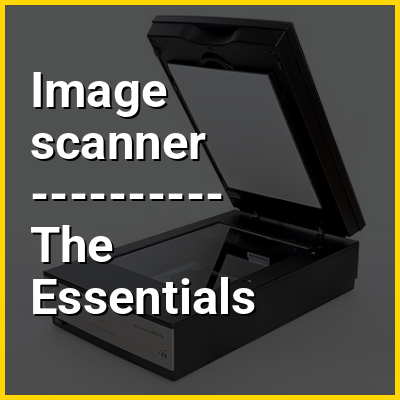
An image scanner (often abbreviated to just scanner) is a device that optically scans images, printed text, handwriting, or an object and converts it to a digital image. The most common type of scanner used in the home and the office is the flatbed scanner, where the document is placed on a glass bed. A sheetfed scanner, which moves the page across an image sensor using a series of rollers, may be used to scan one page of a document at a time or multiple pages, as in an automatic document feeder. A handheld scanner is a portable version of an image scanner that can be used on any flat surface. Scans are typically downloaded to the computer that the scanner is connected to, although some scanners are able to store scans on standalone flash media (e.g., memory cards and USB drives).

Modern scanners typically use a charge-coupled device (CCD) or a contact image sensor (CIS) as the image sensor, whereas drum scanners, developed earlier and still used for the highest possible image quality, use a photomultiplier tube (PMT) as the image sensor. Document cameras, which use commodity or specialized high-resolution cameras, photograph documents all at once.
↓ Menu
HINT:

👉 Image scanner in the context of Computer lab

A computer lab is a space where computer services are provided to a defined community. These are typically public libraries and academic institutions. Generally, users must follow a certain user policy to retain access to the computers. This usually consists of rules such as no illegal activity during use or attempts to circumvent any security or content-control software while using the computers.

Computer labs are often subject to time limits in order to allow more people access to use the lab. It is also common for personal login credentials to be required for access. This allows institutions to track the user's activities for any possible fraudulent use. The computers in computer labs are typically equipped with Internet access, scanners, and printers and are typically arranged in rows. This is to give the workstation a similar view to facilitate lecturing or presentations, and also to facilitate small group work.

↓ Explore More Topics
In this Dossier

Image scanner in the context of Input device

In computing, an input device is a piece of equipment used to provide data and control signals to an information processing system, such as a computer or information appliance. Examples of input devices include keyboards, computer mice, scanners, cameras, joysticks, and microphones.

View the full Wikipedia page for Input device
↑ Return to Menu

Image scanner in the context of Digitizing

Digitization is the process of converting information into a digital (i.e. computer-readable) format. The result is the representation of an object, image, sound, document, or signal (usually an analog signal) obtained by generating a series of numbers that describe a discrete set of points or samples. The result is called digital representation or, more specifically, a digital image, for the object, and digital form, for the signal. In modern practice, the digitized data is in the form of binary numbers, which facilitates processing by digital computers and other operations, but digitizing simply means "the conversion of analog source material into a numerical format"; the decimal or any other number system can be used instead.

Digitization is of crucial importance to data processing, storage, and transmission, because it "allows information of all kinds in all formats to be carried with the same efficiency and also intermingled." Though analog data is typically more stable, digital data has the potential to be more easily shared and accessed and, in theory, can be propagated indefinitely without generation loss, provided it is migrated to new, stable formats as needed. This potential has led to institutional digitization projects designed to improve access and the rapid growth of the digital preservation field.

View the full Wikipedia page for Digitizing
↑ Return to Menu

Image scanner in the context of Hasselblad

Victor Hasselblad AB is a Swedish manufacturer of medium format cameras, photographic equipment and image scanners based in Gothenburg, Sweden. The company originally became known for its classic analog medium-format cameras that used a waist-level viewfinder. Perhaps the most famous use of the Hasselblad camera was during the Apollo program missions when the first humans landed on the Moon. Almost all of the still photographs taken during these missions used modified Hasselblad cameras. In 2016, Hasselblad introduced the world's first digital compact mirrorless medium-format camera, the X1D-50c, changing the portability of medium-format photography. Hasselblad produces about 10,000 cameras a year from a small three-storey building.

View the full Wikipedia page for Hasselblad
↑ Return to Menu

Image scanner in the context of DjVu

DjVu is a computer file format designed primarily to store scanned documents, especially those containing a combination of text, line drawings, indexed color images, and photographs. It uses technologies such as image layer separation of text and background/images, progressive loading, arithmetic coding, and lossy compression for bitonal (monochrome) images. This allows high-quality, readable images to be stored in a minimum of space, so that they can be made available on the web.

DjVu has been promoted as providing smaller files than PDF for most scanned documents. The DjVu developers report that color magazine pages compress to 40–70 kB, black-and-white technical papers compress to 15–40 kB, and ancient manuscripts compress to around 100 kB; a satisfactory JPEG image typically requires 500 kB. Like PDF, DjVu can contain an OCR text layer, making it easy to perform copy and paste and text search operations.

View the full Wikipedia page for DjVu
↑ Return to Menu

Image scanner in the context of Digital duplicator

A digital duplicator, also known as a printer-duplicator, is a printing technology designed for high-volume, repetitive print jobs (100 copies or more). Digital duplicators can provide a reliable and cost efficient alternative to toner-based copiers or offset printing equipment.

The digital duplicator begins by digitally scanning the original and then transferring it to a master template through a thermal imaging process. Then the master is automatically wrapped around a print cylinder, where the ink is drawn through the perforations in the master creating the print.

View the full Wikipedia page for Digital duplicator
↑ Return to Menu

Image scanner in the context of Duplicating machines

Duplicating machines were the predecessors of modern document-reproduction technology. They have now been replaced by digital duplicators, scanners, laser printers, and photocopiers, but for many years they were the primary means of reproducing documents for limited-run distribution. The duplicator was pioneered by Thomas Edison and David Gestetner, with Gestetner dominating the market up until the late 1990s.

Like the typewriter, these machines were products of the second phase of the Industrial Revolution which started near the end of the 19th century (also called the Second Industrial Revolution). This second phase brought to mass markets technologies like the small electric motors and the products of industrial chemistry without which the duplicating machines would not have been economical. By bringing greatly increased quantities of paperwork to daily life, the duplicating machine and the typewriter gradually changed the forms of the office desk and transformed the nature of office work.

View the full Wikipedia page for Duplicating machines
↑ Return to Menu

Image scanner in the context of Exif

Exchangeable image file format (officially Exif, according to JEIDA/JEITA/CIPA specifications) is a standard that specifies formats for images, sound, and ancillary tags used by digital cameras (including smartphones), scanners and other systems handling image and sound files recorded by digital cameras. The specification uses the following existing encoding formats with the addition of specific metadata tags: JPEG lossy coding for compressed image files, TIFF Rev. 6.0 (RGB or YCbCr) for uncompressed image files, and RIFF WAV for audio files (linear PCM or ITU-T G.711 μ-law PCM for uncompressed audio data, and IMA-ADPCM for compressed audio data). It does not support JPEG 2000 or GIF encoded images.This standard consists of the Exif image file specification and the Exif audio file specification.

View the full Wikipedia page for Exif
↑ Return to Menu

Image scanner in the context of Canon Inc.

Canon Inc. (Japanese: キヤノン株式会社; Hepburn: Kyanon kabushiki gaisha) is a Japanese multinational corporation headquartered in Ōta, Tokyo, specializing in optical, imaging, and industrial products, such as lenses, cameras, medical equipment, scanners, printers, and semiconductor manufacturing equipment.

Canon has a primary listing on the Tokyo Stock Exchange and is a constituent of the TOPIX Core 30 and Nikkei 225 indexes. It used to have a secondary listing on the New York Stock Exchange.

View the full Wikipedia page for Canon Inc.
↑ Return to Menu

Image scanner in the context of Networking cable

Networking cable is a piece of networking hardware used to connect one network device to other network devices or to connect two or more computers to share devices such as printers or scanners. Different types of network cables, such as coaxial cable, optical fiber cable, and twisted pair cables, are used depending on the network's topology, protocol, and size. The devices can be separated by a few meters (e.g. via Ethernet) or nearly unlimited distances (e.g. via the interconnections of the Internet).

While wireless networks are more easily deployed when total throughput is not an issue, most permanent larger computer networks utilize cables to transfer signals from one point to another.

View the full Wikipedia page for Networking cable
↑ Return to Menu

Image scanner in the context of Decentralized network protocol

Decentralized computing is the allocation of resources, both hardware and software, to each individual workstation, or office location. In contrast, centralized computing exists when the majority of functions are carried out or obtained from a remote centralized location. Decentralized computing is a trend in modern-day business environments. This is the opposite of centralized computing, which was prevalent during the early days of computers. A decentralized computer system has many benefits over a conventional centralized network. Desktop computers have advanced so rapidly, that their potential performance far exceeds the requirements of most business applications. This results in most desktop computers remaining idle (in relation to their full potential). A decentralized system can use the potential of these systems to maximize efficiency. However, it is debatable whether these networks increase overall effectiveness.

All computers have to be updated individually with new software, unlike a centralized computer system. Decentralized systems still enable file sharing and all computers can share peripherals such as printers and scanners as well as modems, allowing all the computers in the network to connect to the internet.

View the full Wikipedia page for Decentralized network protocol
↑ Return to Menu

Image scanner in the context of Multi-function printer

An MFP (multi-function product/printer/peripheral), multi-functional, all-in-one (AIO), or multi-function device (MFD), is an office machine which incorporates the functionality of multiple devices in one, so as to have a smaller footprint in a home or small business setting (the SOHO market segment), or to provide centralized document management/distribution/production in a large-office setting. A typical MFP may act as a combination of some or all of the following devices: email, fax, photocopier, printer, scanner.

View the full Wikipedia page for Multi-function printer
↑ Return to Menu

Image scanner in the context of Duplex scanning

Duplex scanning is a feature of some computer scanners, and multifunction printers (MFPs) that support duplex printing. A duplex scanner can automatically scan a sheet of paper on both sides. Scanners without this capability can only scan both sides of a sheet of paper by reinserting it manually the other way up.

Duplex scanning is usually implemented on multifunction printers using a Reversing Automatic Document Feeder (RADF), which removes, reverses, and re-feeds the document after scanning one side. Duplex scanning is achieved on scanners by either RADF or by single pass duplex scanning using two cameras, one for each side of document; two-camera scanners scan twice as fast as a similar two-pass scanner.

View the full Wikipedia page for Duplex scanning
↑ Return to Menu

Image scanner in the context of Automatic Document Feeder

In multifunction or all-in-one printers, fax machines, photocopiers and scanners, an automatic document feeder or ADF is a feature which takes several pages and feeds the paper one page at a time into a scanner or copier, allowing the user to scan, and thereby copy, print, or fax, multiple-page documents without having to manually replace each page.

Most copiers allow scanning on the flatbed or platen (the "glass") or through a document feeder. The vast majority of fax machines have an ADF, allowing the unattended sending of multi-page faxes. ADF is so ubiquitous in fax machines that some fax machine owners use the machine as a scanner, faxing multi-page documents to themselves. Document feeders are described by speed, in pages per minute or ppm, and capacity, usually in a range from 10 sheets to 200.

View the full Wikipedia page for Automatic Document Feeder
↑ Return to Menu

Image scanner in the context of Epson

Seiko Epson Corporation, commonly known as Epson, is a Japanese multinational electronics company and one of the world's largest manufacturers of printers and information- and imaging-related equipment. Headquartered in Suwa, Nagano, Japan, the company has numerous subsidiaries worldwide and manufactures inkjet, dot matrix, thermal and laser printers for consumer, business and industrial use, scanners, laptop and desktop computers, video projectors, watches, point of sale systems, robots and industrial automation equipment, semiconductor devices, crystal oscillators, sensing systems and other associated electronic components.

The company has developed as one of manufacturing and research and development (formerly known as Seikosha) of the former Seiko Group, a name traditionally known for manufacturing Seiko timepieces. Seiko Epson was one of the major companies in the Seiko Group, but is neither a subsidiary nor an affiliate of Seiko Group Corporation.

View the full Wikipedia page for Epson
↑ Return to Menu

Image scanner in the context of Pixels per inch

Pixels per inch (ppi) and pixels per centimetre (ppcm or pixels/cm) are measurements of the pixel density of an electronic image device, such as a computer monitor or a television set's display, or image digitizing device such as a camera or image scanner. Horizontal and vertical density are usually the same, as most devices have square pixels, but differ on devices that have non-square pixels. Pixel density is not the same as resolution — where the former describes the amount of detail on a physical surface or device, the latter describes the amount of pixel information regardless of its scale. Considered in another way, a pixel has no inherent size or unit (a pixel is actually a sample), but when it is printed, displayed, or scanned, then the pixel has both a physical size (dimension) and a pixel density (ppi).

View the full Wikipedia page for Pixels per inch
↑ Return to Menu